
Sales Tax Compliance for Business Owners: A Practical Guide

Sales tax compliance is the ongoing process of correctly charging, collecting, reporting, and remitting sales and use taxes in every jurisdiction where your business has a legal obligation. The operational plan is straightforward: identify nexus, register where required, charge the right rate, file on time, and reconcile your books to your returns. Three things you can do in the next 72 hours: pull your transaction data by state and compare it against the common economic nexus thresholds (most states use a common economic nexus threshold for sales or transactions, a standard set after South Dakota v. Wayfair); confirm your most recent filing was submitted and the payment cleared; and verify that your exemption certificates are on file for every customer claiming a tax-exempt status. Those three steps alone will surface the majority of near-term exposure your finance team needs to address.
Table of Contents
- The 8-step sales tax compliance cycle
- How to determine nexus and where to register
- How to determine what’s taxable and manage exemption certificates
- How to calculate rates, apply sourcing rules, and remit correctly
- Filing schedules, penalties, and how to respond to notices and audits
- How to reconcile your books to filed returns and set internal controls
- When does sales tax automation make financial sense?
- Key Takeaways
- The compliance cadence that actually holds
- Zivvy keeps your compliance data in one place
- Primary sources and further reading
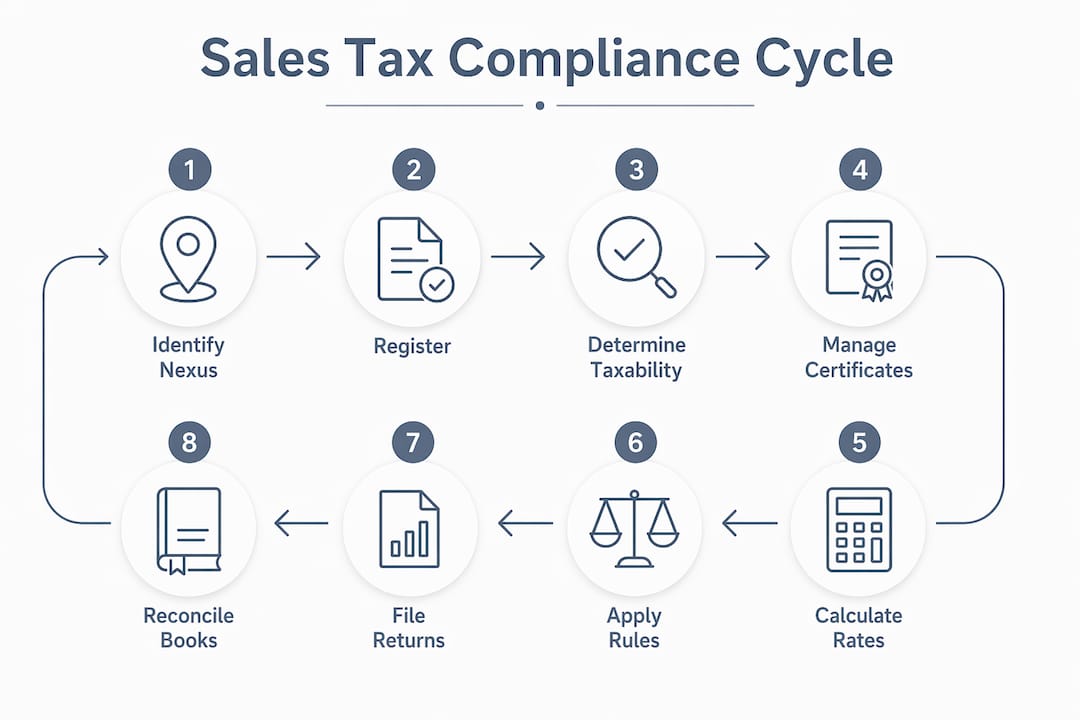
The 8-step sales tax compliance cycle
Sales tax compliance follows a repeatable eight-step cycle. Run it every filing period, assign clear ownership for each step, and it becomes a predictable operational rhythm rather than a quarterly scramble.
-
Gather transaction data. Export all sales records from every channel — your ERP, ecommerce platform, marketplace accounts, and point-of-sale system. The deliverable is a single, complete transaction file with ship-to address, product category, and sale amount for the period.
-
Reconcile sales. Match total gross sales in your transaction file to your general ledger. Discrepancies here mean either missing transactions or misclassified revenue. Resolve them before moving forward.
-
Determine nexus and taxability. For each state where you have sales, confirm whether you have nexus (physical or economic) and whether the products or services sold are taxable there. Flag any new states where you may have crossed a threshold during the period.
-
Register where required. If nexus analysis reveals a new obligation, complete registration on that state’s Department of Revenue (DOR) site before collecting tax. Capture the account number and filing frequency assigned at registration.
-
Calculate tax. Apply the correct combined rate (state + county + city + district) to each taxable transaction using destination-based sourcing in most states. Use a certified rate feed or your state DOR’s rate tables — not a cached or manually maintained spreadsheet.
-
File returns. Submit returns by the due date for each jurisdiction. States assign filing frequency (monthly, quarterly, or annual) based on your sales volume. Even if you had no taxable sales in a period, file a zero return if the state requires it.
-
Remit payment. Pay the tax owed through the state’s preferred payment method — ACH debit, EFT, or online portal. Confirm the payment posts and save the confirmation number.
-
Maintain a tax calendar. Log every jurisdiction’s filing frequency, due dates, payment method, and remittance confirmation in a living tax calendar. This is your audit trail and your early-warning system for upcoming deadlines.
Quick wins to act on now: If you sell through a marketplace like Amazon or Etsy, confirm whether that marketplace is collecting and remitting on your behalf under marketplace facilitator laws — many sellers carry phantom liability because they assume the marketplace handles everything. On exemption certificates, flag any that are expired or missing a required field; those are the first items an auditor will request.
Red flags to escalate immediately: Untracked sales through a marketplace you haven’t reviewed for facilitator status; states where you’ve exceeded $100,000 in sales but haven’t registered; and any state notice sitting unanswered in a shared inbox.
How to determine nexus and where to register
Nexus is the legal connection between your business and a state that creates a tax collection obligation. Get this wrong, and you face retroactive liability — back taxes, interest, and penalties for every period you should have been collecting but weren’t.

Physical nexus is triggered by a tangible presence: an office, warehouse, employee, sales rep, or inventory stored at a third-party logistics (3PL) facility. If your products sit in an Amazon fulfillment center in Ohio, you likely have physical nexus in Ohio.
Economic nexus was established by the South Dakota v. Wayfair Supreme Court decision and allows states to require tax collection based on sales activity alone, regardless of physical presence. The most common threshold is $100,000 in annual sales or 200 separate transactions into a state — though thresholds vary, so always verify with the specific state DOR.
| Nexus Trigger | Typical Evidence to Capture | Where to Find Proof |
|---|---|---|
| Office or store location | Lease agreement, utility bills | Legal/facilities records |
| Remote employee or contractor | Employment contract | HR system or payroll records |
| Inventory at a 3PL or warehouse | Fulfillment center agreement, inventory reports | 3PL portal or warehouse contract |
| Economic nexus (sales volume) | State-by-state sales totals by period | ERP or ecommerce sales reports |
| Economic nexus (transaction count) | Transaction count by ship-to state | Order management system |
| Trade show or temporary presence | Event registration, booth contract | Marketing or event records |
| Marketplace activity | Marketplace seller agreement, sales reports | Marketplace seller dashboard |
Registration basics: Once you confirm nexus, register through the state’s DOR website before you begin collecting. Most states use their own registration portals; many also participate in the Streamlined Sales Tax (SST) program, which allows a single registration across member states. You’ll typically need your federal EIN, business entity type, start date of nexus, and a description of what you sell. Failing to register doesn’t eliminate the obligation — it just converts it into retroactive liability with interest.
States may also require zero returns even when all your sales in a period are exempt, so don’t assume a quiet month means no filing is due.
Pro Tip: Build a nexus analysis log as a simple spreadsheet or database table with these fields: state, nexus type (physical/economic), trigger date, evidence document reference, registration date, and account number. Update it every quarter. If an auditor asks how you determined your filing obligations, this log is your first line of defense — and it takes less than an hour per quarter to maintain.
How to determine what’s taxable and manage exemption certificates
Taxability is not uniform. A product that’s fully taxable in Texas may be exempt in New York, and a SaaS subscription taxed in one state may be entirely exempt in another. Your finance team needs a working taxability matrix — not a general assumption that “we sell physical goods, so everything is taxable.”
Key taxability variables to evaluate:
- Product category: Tangible personal property is taxable in most states by default; food, clothing, prescription drugs, and agricultural inputs often carry exemptions or reduced rates.
- Digital products and SaaS: States vary widely. Some tax downloaded software, streaming services, and SaaS; others don’t. This is one of the fastest-changing areas of state tax law.
- Services: Most states don’t tax services by default, but a growing number do — particularly for digital services, information services, and services bundled with taxable goods.
- Destination vs. origin sourcing: Most states use destination-based sourcing after Wayfair, meaning the tax rate is based on where the buyer receives the product. A handful of states use origin-based sourcing for in-state transactions, applying the rate at the seller’s location.
Exemption and resale certificates — what a valid certificate requires:
- Buyer’s legal name and address
- Buyer’s sales tax permit or exemption number
- Type of exemption claimed (resale, government, nonprofit, agricultural, etc.)
- Description of the items being purchased
- Buyer’s signature and date
- State-specific form where required (some states mandate their own form)
Failure to maintain valid exemption records can turn exempt sales into taxable sales during an audit — meaning you owe the tax your customer didn’t pay, plus penalties.
Certificate collection and retention process:
- Request a certificate before the first exempt sale, not after.
- Validate the certificate is complete and the permit number is active (most state DOR sites have a permit lookup tool).
- Store certificates in a centralized, indexed folder — organized by customer, with the state and expiration date visible at the top level.
- Set a calendar reminder to re-collect certificates every one to three years, or whenever a customer’s exempt status changes.
- Retain certificates for at least four years after the last exempt sale, or longer if your state’s statute of limitations exceeds that.
Pro Tip: Create an “audit-ready certificate folder” with a master index file listing: customer name, state, certificate type, issue date, expiration date, and file path. When an auditor requests exemption documentation, you hand them the index and the folder — not a disorganized pile of PDFs. The index alone signals that your team runs a controlled process, which sets a different tone for the audit from the start.
How to calculate rates, apply sourcing rules, and remit correctly
The U.S. has more than 11,000 sales and use tax jurisdictions, each with its own rate. The combined rate a buyer pays is typically the sum of the state rate, county rate, city rate, and any applicable special district rates (transit, stadium, tourism). Getting this right at the transaction level requires a current, certified rate source — not a rate you looked up six months ago.
Rate sourcing hierarchy:
- State DOR published rate tables (authoritative, but updated on a schedule)
- Certified rate feeds from tax data providers (updated in real time, mapped to ZIP+4 or address)
- District-specific notices for special taxing districts (often missed by general rate tables)
Stale rates are a common audit finding. A rate change that took effect on January 1 and wasn’t applied until March means three months of under-collected tax — and the liability falls on the seller, not the buyer.
Marketplace facilitator rules change the collection equation for sellers on platforms like Amazon, Walmart Marketplace, or Etsy. Under marketplace facilitator laws now in effect in all 50 states, the marketplace is responsible for collecting and remitting sales tax on sales it facilitates. That means if you sell exclusively through a qualifying marketplace, the marketplace handles collection and remittance for those sales. But if you also sell direct-to-consumer through your own website, you remain responsible for those transactions. Confirm your marketplace’s facilitator status in writing, and don’t assume it covers all channels.
A worked example: Your business sells a $200 software accessory (taxable tangible personal property) to a buyer in Denver, Colorado. The combined rate in Denver is the Colorado state rate plus the Denver city rate plus applicable district rates. You apply the destination-based rate to the $200 sale, calculate the tax, and add it as a separate line item on the invoice. Round to the nearest cent per transaction — not per line item — to avoid rounding errors that accumulate across high-volume periods.
Businesses often spend substantial resources monthly identifying state sales tax obligations and filing requirements, with automation becoming cost-effective as filing complexity increases. At that cost, the ROI case for automation becomes straightforward once you’re filing in more than three or four states.
Filing schedules, penalties, and how to respond to notices and audits
States assign filing frequency based on your sales volume in that state. Higher volume means more frequent filing — and more frequent exposure to late-filing penalties if your calendar isn’t tight.

| Annual Sales Volume (Typical State Threshold) | Filing Frequency | Typical Due Date |
|---|---|---|
| — | Annual | 30 days after year-end |
| — | Quarterly | Last day of month following quarter |
| — | Monthly | — |
These thresholds are illustrative — every state sets its own rules. Always confirm your assigned frequency with the state DOR at registration and whenever your sales volume changes significantly.
Penalties for non-compliance typically include a percentage of the tax owed for late filing, a separate penalty for late payment, and interest that accrues daily. Some states also impose penalties for failure to file a return at all, even when no tax is owed. Zero returns matter: if you’re registered in a state and had no taxable sales in a period, file the return anyway.
Audit and notice response checklist:
When a state notice arrives, the clock starts immediately. Most state tax authorities give short response windows — sometimes as few as 30 days.
- Log the notice with the date received, the state, the tax type, and the period under review.
- Identify the issue — is it a discrepancy notice, an information request, or a formal audit initiation?
- Pull the relevant records for the period: filed returns, remittance confirmations, transaction detail, and exemption certificates.
- Assign a single point of contact to manage the response. Fragmented responses create inconsistencies.
- Respond in writing within the stated deadline, even if only to acknowledge receipt and request an extension.
- Engage a tax professional if the notice escalates to a formal audit or involves a material amount.
Compliance checks often begin with a notice of discrepancy; failing to respond quickly can escalate to a full audit requiring transaction-level documentation. Proactive document management is what separates a resolved notice from a multi-year audit.
Voluntary disclosure agreements (VDAs): If you discover you should have been collecting tax in a state but weren’t, don’t wait for the state to find you. Many states offer VDAs that limit the lookback period and reduce or waive penalties — but only if you come forward before the state initiates contact. VDAs are one of the most underused tools in compliance remediation.
How to reconcile your books to filed returns and set internal controls
Reconciliation is where most errors surface. The sequence runs from source transactions through your general ledger (GL), through the tax calculation layer, and finally to the filed return. A mismatch at any point in that chain creates a discrepancy that either overstates or understates your liability.
Where mismatches commonly occur:
- Transactions recorded in the wrong period (cutoff errors)
- Exempt sales included in taxable totals due to missing certificates
- Rate errors from stale rate tables applied at checkout
- Marketplace sales double-counted when the marketplace also remits
- Manual journal entries that adjust revenue but not the tax line
Reconciliation checklist — run every filing cycle:
- Lock the reporting period in your accounting system before exporting data. This prevents retroactive changes that create discrepancies between your books and the filed return.
- Export taxable sales by state from your GL for the period.
- Compare the GL taxable sales total to the taxable sales reported on the filed return for each state.
- Investigate any variance greater than your materiality threshold (set this in your policy — a common starting point is $100 or 1% of the period’s tax liability, whichever is lower).
- Document the resolution of each variance with a brief note and an adjusting entry if needed.
- Confirm the remittance payment posted to the state’s account and save the confirmation.
- File the reconciliation summary in your tax records folder for the period.
Records to retain and for how long:
- Sales transaction detail: minimum four years (longer in states with extended statutes of limitations)
- Exemption certificates: four years after the last exempt sale
- Filed returns and remittance confirmations: minimum four years
- Nexus analysis documentation: indefinitely, or until the statute of limitations closes for each period
Pro Tip: Lock historical reporting periods in your accounting or ERP system as soon as the return for that period is filed and reconciled. Then maintain a change log — a simple dated record of any post-lock adjustments — so that if an auditor compares your current GL to a filed return, you can explain every difference. Without that log, a legitimate correction looks like a discrepancy. With it, you look like a team that runs a controlled process.
For finance teams building tax-ready operational records, the reconciliation step is where the quality of your underlying data either pays off or creates hours of manual cleanup.
When does sales tax automation make financial sense?
Automation isn’t the right answer for every business at every stage. But there’s a clear inflection point where manual compliance becomes more expensive than the tooling that replaces it.
Decision checklist — automation is likely cost-effective when:
- You have nexus in three or more states
- Your transaction volume exceeds a few hundred orders per month
- You sell across multiple channels (direct, marketplace, wholesale)
- Your product catalog includes items with varying taxability across states
- You’ve received a state notice or failed a reconciliation check in the past 12 months
- Your finance team spends more than a few hours per month on rate lookups, return prep, or certificate management
Feature checklist — what to look for in a tax automation tool:
- Real-time rate lookups tied to address-level accuracy (ZIP+4 or rooftop geocoding)
- Nexus monitoring with threshold alerts before you cross a registration trigger
- Exemption certificate management with storage, validation, and expiration tracking
- Automated return preparation and filing integration with state DOR portals
- Audit support: transaction-level detail exportable in the format auditors request
- API or webhook connectivity to your GL, ERP, or ecommerce platform so data flows without manual exports
Implementation timeline: Most teams can connect a tax automation tool to their existing accounting or ecommerce stack within two to four weeks. The highest-ROI starting point is nexus monitoring and rate lookups — those two functions eliminate the most common sources of under-collection and over-collection errors before they compound across filing periods.
Pro Tip: For fast-growing sellers, the single highest-ROI automation area is nexus threshold monitoring. A threshold crossed in Q1 that isn’t caught until Q4 means three quarters of uncollected tax, retroactive registration, and potential penalties. An automated alert at 80% of a state’s threshold gives your team time to register before the obligation kicks in — turning a compliance crisis into a routine task.
Zivvy’s AI automation features and ecommerce integrations are built to connect your transaction data across channels into a single ledger, which is the foundation any tax automation tool needs to work accurately.
Key Takeaways
Effective sales tax compliance requires a repeatable cycle of nexus identification, timely registration, accurate rate application, and reconciled recordkeeping — with automation becoming cost-justified once you operate in three or more states.
| Point | Details |
|---|---|
| Nexus comes first | Identify physical and economic nexus in every state before collecting or filing anything. |
| Register before you collect | Filing without registration creates retroactive liability; complete state DOR registration and capture your account number. |
| Reconcile every period | Match GL taxable sales to filed returns each cycle; lock periods immediately after filing to prevent discrepancies. |
| Automation pays off at scale | Mid-sized businesses spend an average of $1,740/month identifying state sales tax obligations and filing requirements; automation is typically justified once you file in three or more states. |
| Zivvy centralizes the data layer | Zivvy’s integrations and automated bank reconciliation consolidate transaction records across channels, supporting the reconciliation and audit-readiness steps in this checklist. |
The compliance cadence that actually holds
The businesses that stay ahead of sales tax obligations aren’t necessarily the ones with the most sophisticated tools. They’re the ones that treat compliance as a recurring operational task with a named owner, a fixed cadence, and a short checklist — not a project that gets picked up when a notice arrives.
The practical cadence that works for most founder-led finance teams: a monthly close that includes a nexus threshold check, a reconciliation of GL taxable sales to filed returns, and a certificate audit for any new exempt customers added during the month. Quarterly, the team reviews the tax calendar for upcoming registrations and confirms filing frequencies haven’t changed. Annually, the nexus analysis is refreshed against the full year’s transaction data.
The most common process failure isn’t ignorance of the rules. It’s siloed data — marketplace sales sitting in one system, direct sales in another, and no one reconciling the two before the return is filed. The fix is structural: one system of record for all transaction data, with a clear owner responsible for the monthly reconciliation step. When that structure is in place, the compliance cycle runs on schedule rather than in reaction to a notice.
Zivvy keeps your compliance data in one place
Managing sales tax obligations across multiple states requires clean, centralized transaction data — and that’s exactly where fragmented tools create the most risk. Zivvy brings your sales records, accounting, and ecommerce data into a single platform, so your finance team isn’t manually stitching together exports from four different systems before every filing deadline.
Two checklist items map directly to Zivvy’s core capabilities: centralizing transaction data across channels (Zivvy’s ecommerce integrations sync marketplace and direct sales into one ledger) and locking periods with automated bank reconciliation (Zivvy’s reconciliation features let your team close a period cleanly and maintain the audit trail auditors expect). Clients report consolidating from four tools to one after onboarding, with rapid setup that doesn’t require a months-long implementation project.
If your finance team is spending hours each month on manual exports and rate lookups, see how Zivvy handles the data layer. Take the product tour to walk through the reconciliation and integration features relevant to your compliance workflow.
Primary sources and further reading
These are the authoritative sources your team should consult directly for registration, rates, and voluntary disclosure programs.
State Departments of Revenue: Each state’s DOR website is the definitive source for registration portals, current rate tables, filing frequency rules, and zero-return requirements. Search for “sales tax registration” or “sales and use tax” on the state’s official .gov site. The Texas Comptroller’s office is a useful model for the level of detail most state DOR sites provide.
Streamlined Sales Tax (SST) Program: For businesses registering in multiple states, the SST program offers a single registration process across member states. Visit streamlinedsalestax.org for the current member list and registration portal.
South Dakota v. Wayfair (2018): The Supreme Court decision that established economic nexus. The full opinion is available through the Supreme Court’s official website; Thomson Reuters provides a practical summary of its implications for sales tax vs. VAT obligations.
Voluntary Disclosure Agreements: The Multistate Tax Commission (MTC) administers a national VDA program that allows businesses to simultaneously apply for voluntary disclosure in multiple states. Visit mtc.gov for program details and eligibility requirements.
Sales Tax Institute: The Sales Tax Institute publishes practitioner-level guidance on the compliance cycle, filing requirements, and audit response — a reliable reference for finance teams building internal procedures.
Marketplace facilitator guidance: Each state’s DOR publishes specific guidance on which marketplaces qualify as facilitators and what that means for third-party sellers. Search “[state name] marketplace facilitator law” on the state DOR site for the current rules.
This article is general information, not legal or tax advice. Confirm current rules and thresholds with your state DOR or a qualified tax professional before making compliance decisions for your specific situation.
Recommended
- Tax-Ready Operational Records: What Your Accountant Wishes You Captured | Zivvy Blog
- Accounts Receivable Playbook for SMBs That Hate Chasing Payments | Zivvy Blog
- Credit Limit Enforcement That Sales Will Actually Respect | Zivvy Blog
- Total Cost of Ownership for ERP: Licenses Are the Easy Part | Zivvy Blog